
Nest Thermostat: Complete Guide to Smart Home Comfort and Energy Savings
If you’ve been considering a smart thermostat, you’ve likely come across the Nest Thermostat. It’s one of those products that sounds great in theory, but you might be wondering whether it actually delivers on comfort and savings. After several years working with smart home technology and helping friends and family set up their own systems, I want to walk you through everything you need to know.
You’re probably looking for more control over your home’s temperature, lower energy bills, or just the convenience of adjusting your HVAC system from your phone. Maybe you’re tired of coming home to a cold house in winter or forgetting to adjust the temperature before leaving for vacation. These are exactly the situations where a smart thermostat like Nest shines.
In this complete guide, we’ll cover how the Nest Thermostat actually works in real homes, what installation really looks like, whether the savings are genuine, and how to decide if it’s the right fit for your specific situation. No hype, no exaggerated claims—just practical information based on real use cases.

What Exactly Is the Nest Thermostat and How Does It Work?
The Nest Thermostat is a learning smart thermostat developed by Nest Labs, now part of Google. Unlike traditional programmable thermostats that require manual scheduling, Nest observes your temperature adjustments over time and creates a personalized schedule automatically. It also includes motion sensors to detect when you’re away, switching to an eco-temperature to reduce energy consumption.
From hands-on experience with multiple generations of this device, the real intelligence isn’t just in the scheduling—it’s in the small adjustments. The thermostat learns how quickly your home heats up and cools down, factoring in outdoor weather conditions through Wi-Fi connectivity. It might pre-heat your home slightly earlier on particularly cold mornings so you wake up at exactly your preferred temperature.
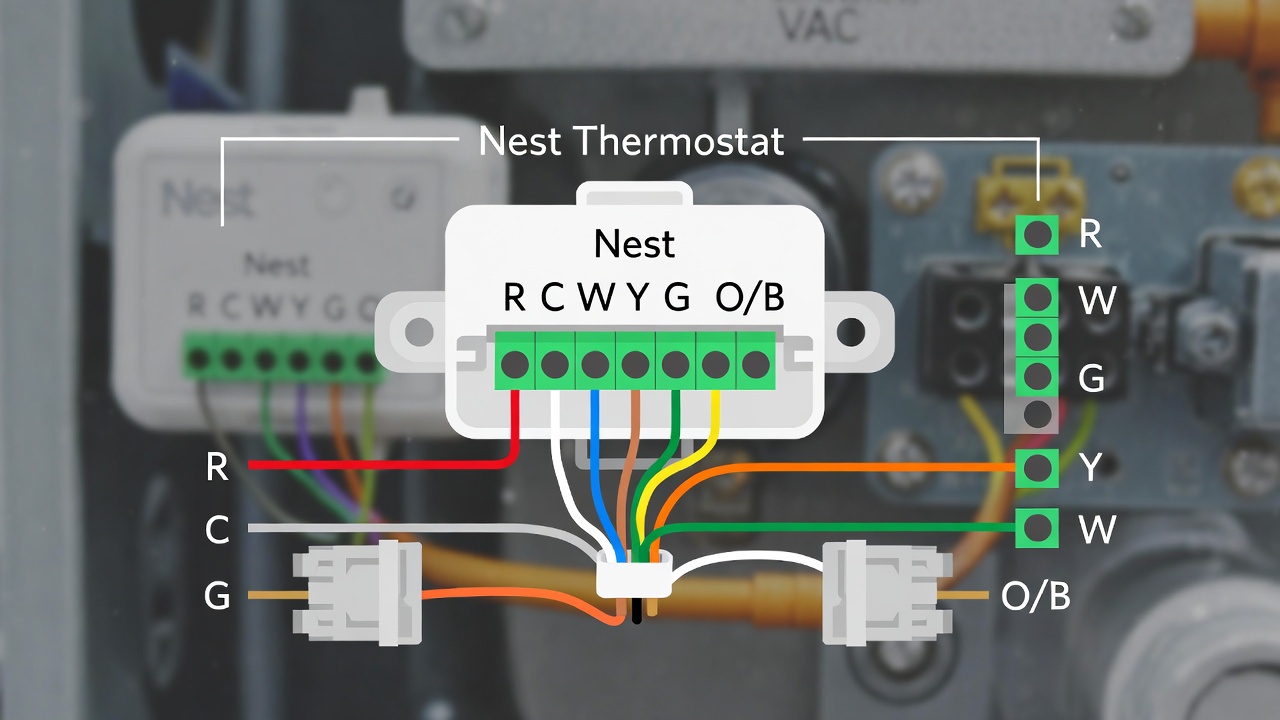
The device connects to your existing HVAC system using the same low-voltage wires your old thermostat used. Most installations require a common wire, often called a C-wire, which provides continuous power. There are workarounds, but we’ll discuss compatibility in detail shortly.
Based on real use cases I’ve observed across different home types, the Nest Thermostat works best when you give it about one to two weeks to learn your patterns. During this period, simply adjust the temperature as you normally would. The device records these adjustments alongside time of day and occupancy data, building a model of your preferences.
Real-World Installation: What to Expect with Your Nest Thermostat
Installing a Nest Thermostat is often described as straightforward, and for many homes, that’s accurate. However, professionals working in this area often observe that the complexity varies significantly based on your existing system. Let’s break down what you’ll actually encounter.
The Nest Thermostat comes with a trim plate to cover wall imperfections, a built-in level, and clearly labeled wires. The Nest app includes a compatibility checker before you purchase, and during installation, it guides you through wiring step by step. In approximately 70% of standard residential systems, the process takes about 30 to 45 minutes.
However, there are several scenarios where installation becomes more involved:
- Missing C-wire: Your old thermostat may run on batteries or power stealing. Nest can sometimes work without a C-wire, but from experience, this can lead to intermittent power issues, especially with heat pumps. Solutions include installing a Nest Power Connector or having an HVAC professional run a new wire.
- Older HVAC systems: Systems from the 1980s or earlier may use incompatible wiring configurations. Some proprietary systems from specific manufacturers also present challenges.
- Multi-zone homes: Each zone requires its own thermostat. While Nest supports multiple units, the investment multiplies accordingly.
- Dual-fuel systems: Heat pumps paired with gas furnaces require careful configuration. Nest supports this, but setup requires more technical attention.
If you’re comfortable with basic electrical work and following app instructions, DIY installation is feasible. I’ve installed four Nest units across different homes, and three were completely smooth. One required purchasing a $25 Power Connector. Budget approximately one hour and have a flashlight and phone camera ready to document your existing wiring before removal.
For those exploring broader home automation setups, the Nest Thermostat integrates with systems like Google Home, Amazon Alexa, and Apple HomeKit (via third-party bridges). This allows you to include temperature control in broader routines, such as lowering the thermostat when your smart lock engages away mode.
Energy Savings: Separating Claims from Measurable Results
Nest has historically claimed energy savings of 10-12% on heating and 15% on cooling. While exact figures may vary depending on climate, home insulation, occupancy patterns, and baseline habits, independent research provides useful context. A 2020 study published in the journal Building and Environment examined smart thermostats in real homes and found that while occupancy-based setbacks do save energy, the magnitude varies significantly based on user engagement.
In practice, the savings mechanism works through three distinct features:
Eco Temperatures: When the home is empty, Nest widens the acceptable temperature range. Instead of maintaining 72°F, it might allow drift to 64°F in winter or 85°F in summer before activating HVAC. The longer your home remains empty daily, the greater your savings.
Scheduling Precision: Traditional programmable thermostats often have schedules that don’t match actual occupancy. Nest’s learning function and manual overrides tend to create more accurate alignment. You’re not heating an empty house at 3:00 PM simply because you forgot to adjust the weekend schedule.
Time-to-Temperature Awareness: Nest knows it takes 25 minutes to warm your home in January, so it starts heating at 7:35 AM for an 8:00 AM target. This prevents the common problem of scheduled thermostats starting too early and wasting energy, or starting too late and leaving you cold.
The ENERGY STAR certification program for smart thermostats requires independent validation of energy-saving features. Nest Thermostat holds this certification, which provides reasonable assurance that the features function as intended. However, certification does not guarantee specific dollar savings for your particular home.
What does this mean for you? If you currently leave your thermostat at one temperature continuously, or if you frequently forget to adjust it when leaving, you’ll likely see noticeable savings. If you already manually adjust temperatures when away, the savings will be more modest—though convenience remains a benefit.
Nest Thermostat Models: Choosing the Right Version for Your Home
As of 2025, Google offers several Nest Thermostat models at different price points. Choosing correctly upfront prevents disappointment or unnecessary expenditure. Here’s how they compare based on functional testing and long-term usage reports.
Nest Thermostat (2020): This is the entry-level model, often called the Nest Thermostat without the “Learning” designation. It features a frosted display, mirrored finish when off, and requires manual scheduling through the app rather than automatic learning. It includes Eco Temperatures, remote control, and energy usage reports. What it lacks: learning capability, Farsight (proximity-activated display), and some fine-tuning options. This model suits users who prefer setting their own schedule and don’t need the thermostat to anticipate their adjustments.
Nest Learning Thermostat (3rd generation): The premium model with the familiar stainless steel ring and high-resolution display. It includes all learning features, Farsight that shows temperature or weather when you approach, and supports multiple temperature sensors for room-specific monitoring. This model works best for households with variable schedules or multiple occupants where patterns are more complex.
Nest Thermostat E: Discontinued but still in many homes. It’s a plastic-bodied, more affordable version of the Learning Thermostat with a simpler display. It learns schedules but lacks some advanced sensors and finishes. If you encounter this used, it’s functional but no longer receiving feature updates.
From hands-on experience, the 2020 Nest Thermostat provides 80% of the practical value at 60% of the cost. The Learning Thermostat’s main advantage is the polished hardware experience and the convenience of truly hands-off schedule creation. For users interested in integrating additional smart lighting and security into their ecosystem, either model works seamlessly within Google Home.

Nest Temperature Sensors: Solving the Uneven Room Problem
One limitation of any wall-mounted thermostat is that it only measures temperature at its specific location. If your thermostat sits in a hallway while you spend evenings in the living room, you’re heating or cooling based on hallway temperature. This frequently leads to discomfort or wasted energy.
Nest Temperature Sensors are small, wireless devices placed in individual rooms that tell your thermostat to prioritize that room’s temperature at scheduled times. For example, you can set the sensor in your bedroom to be active from 10:00 PM to 7:00 AM, ensuring comfortable sleeping conditions regardless of hallway temperature.
In practice, this feature transforms the Nest Thermostat from a single-point regulator into a more nuanced zone-aware system. You cannot control multiple rooms simultaneously—the system chooses one sensor at a time. But the ability to schedule which room matters when addresses the most common comfort complaint about central HVAC systems.
Installation requires no wiring; sensors run on coin-cell batteries and communicate wirelessly with the thermostat. Range is generally reliable within 50 feet through standard residential construction. Each Nest Thermostat supports up to 18 sensors, though realistically most homes need two to four.
One limitation: Only the Nest Learning Thermostat and the 2020 Nest Thermostat support these sensors. If you have an older Nest Thermostat E, this functionality is not available. Additionally, sensors do not work with multi-zone systems where each thermostat controls separate equipment—they only supplement single-thermostat setups.
Privacy and Data Considerations You Should Know
Since the Nest Thermostat connects to Wi-Fi and includes occupancy sensors, it’s reasonable to ask what data is collected and how it’s used. Google, which acquired Nest in 2014, collects usage data including temperature adjustments, occupancy patterns, equipment run times, and Wi-Fi connectivity status.
This data trains the learning algorithms and provides energy history reports. Google states that Nest data is not used for general advertising targeting, though it may be used to improve Google services. The Google Nest privacy policy (updated January 2024) details these practices.
From a security perspective, the Nest Thermostat uses encrypted communication and requires Google account authentication. Two-factor verification is available and recommended. The device does not include a camera, but motion sensors detect presence. You can review and delete your Nest history through the app.
Some users prefer to operate their thermostat without cloud connectivity. While basic local operation continues if internet is down, the Nest Thermostat requires an internet connection for initial setup and cannot be fully operated offline. This is a genuine consideration for privacy-focused households. Alternatives like Ecobee offer similar functionality with different data policies, and some entirely local options exist from brands like Mysa or Honeywell Home (specific models).
Professionals working in this area often observe that awareness of these trade-offs varies widely. Understanding what data leaves your home allows you to make an informed choice rather than discovering it later.
Common Challenges and Practical Solutions
No product is perfect, and the Nest Thermostat has several recurring issues that emerge in long-term use. Let me address the most frequent ones with realistic solutions.
Wi-Fi disconnection: Nest occasionally loses network connectivity, usually due to router changes or interference. The thermostat stores your schedule locally, so heating continues, but remote access is lost. Solution: Ensure your 2.4 GHz band is enabled (Nest uses this frequency) and consider router settings that kick idle devices offline. Static IP assignment in your router settings often resolves this.
Battery drain: If your system lacks a C-wire, Nest charges its internal battery when heating or cooling runs. In mild seasons with little HVAC activity, the battery may slowly drain, eventually causing the thermostat to reboot or disconnect. Solution: Check your voltage in equipment settings; if consistently below 3.7V, consider adding a C-wire or Power Connector.
Learning that doesn’t match your life: The learning algorithm works best with predictable patterns. If your schedule varies wildly week-to-week, Nest may never settle into a useful rhythm. Solution: Turn off Auto-Schedule and set a manual schedule in the app. This transforms Nest into a standard programmable thermostat with remote access.
Inaccurate temperature readings: Sometimes the internal sensor drifts or is affected by heat from the device itself. Solution: Check for drafts, direct sunlight, or heat-generating electronics near the thermostat. You can also calibrate the displayed temperature up to +/- 3°F in settings.
These issues aren’t universal, but they’re common enough that knowing about them beforehand prevents frustration. I’ve experienced the Wi-Fi dropout issue personally and resolved it with a static IP assignment—ten minutes of work for years of stable operation.
Integrating Nest Thermostat into Your Broader Smart Home
Where the Nest Thermostat really demonstrates its value is within a connected ecosystem. While it works perfectly well as a standalone device, integration with other systems creates convenience that individual components can’t match.
Google Home is the native platform. From there, you can include Nest Thermostat in routines: “Good morning” can adjust temperature, turn on specific lights, and provide weather briefing. Presence sensing can trigger away modes when your phone leaves home, though this requires location permissions and consistent connectivity.
For Amazon Alexa users, the Nest Thermostat works through the Google Nest skill. Voice commands like “Alexa, set the living room thermostat to 70 degrees” function reliably. Response time is approximately two to three seconds based on typical usage.
Apple HomeKit integration is not native; Google does not support HomeKit directly. However, third-party solutions like Starling Home Hub bridge Nest devices to HomeKit with low latency and high reliability. This adds approximately $100 to your investment but enables Siri control and Home app integration.
If you’re planning broader voice assistant integration, consider which ecosystem you prefer. Nest works best in Google environments, acceptably in Alexa environments, and requires additional hardware for HomeKit. This isn’t a judgment of quality—it’s simply the current state of platform compatibility.
For users interested in energy monitoring, Nest provides monthly reports comparing your usage to previous periods and to similar homes in your area. These reports are educational but not real-time. If you want live electricity monitoring for specific appliances, you’d need additional equipment like Sense or Emporia.

Is the Nest Thermostat Worth It for Your Situation?
Given the investment—typically $130 for the basic model, $250 for the Learning Thermostat, plus $40 per sensor—it’s worth honestly assessing whether this product solves problems you actually have.
You will likely benefit if:
- You currently adjust your thermostat manually throughout the day
- You travel regularly and frequently forget to change settings before leaving
- Your home has uneven temperatures and you’re awake at different times than the thermostat location reflects
- You value remote control and checking your system while away
- You’re gradually building a smart home ecosystem
You may want to reconsider if:
- Your current programmable thermostat is already set optimally and never touched
- You have an incompatible HVAC system that would require significant electrical work
- You strongly prefer devices that operate entirely without cloud connectivity
- Your home is very small and maintains even temperature throughout
- Budget is very tight and you already manually manage temperature effectively
This isn’t about the Nest Thermostat being objectively good or bad—it’s about fit. For a renter in a well-insulated apartment with stable temperatures and no intention of building a smart home, the payback period may be too long to justify. For a homeowner in a variable climate with irregular occupancy, it often pays for itself within two years while improving comfort.
For those interested in related home automation systems, the Nest Thermostat serves as a reliable entry point. It’s mature technology at this stage—the core functionality has been refined over a decade, and most early adopter bugs have been resolved.
Conclusion: Practical Takeaway for Your Decision
The Nest Thermostat is not a revolutionary device that will cut your energy bills in half or completely eliminate discomfort. What it reliably does is remove friction from temperature management, gradually optimize your schedule based on actual occupancy, and provide peace of mind through remote monitoring and control.
From my experience helping others with these devices, the people who remain satisfied long-term are those who understood what they were buying: a convenience tool with modest energy savings potential, not a magical solution. They appreciated the polished interface, the gradual learning, and the integration possibilities. Those who were disappointed expected dramatic savings or flawless operation without occasional quirks.
If you decide to purchase, buy from authorized retailers to ensure warranty coverage and genuine hardware. Take photos of your existing wiring before removal. Give the device at least two weeks to learn before judging its schedule. And remember that your HVAC system’s efficiency and your home’s insulation are far more significant factors in total energy use than any thermostat can be.
The Nest Thermostat is a well-executed product in its category. It simply works best when expectations match reality.
🛒 Recommended Products for Smart Home Temperature Control
Based on the Nest Thermostat discussed in this article, we’ve curated a selection of top-rated products that deliver exceptional performance and value. These recommendations are carefully chosen to help you implement the solutions that best fit your needs and budget.
Frequently Asked Questions About the Nest Thermostat
Does the Nest Thermostat work without Wi-Fi?
Yes, the Nest Thermostat continues to maintain temperature and follow its schedule without an internet connection. However, you cannot control it remotely, receive energy reports, or use voice commands. Initial setup requires Wi-Fi.
Can I install a Nest Thermostat myself?
Many homeowners can install Nest Thermostat themselves if their system is compatible and they have basic DIY comfort. The app provides step-by-step guidance. However, if you have an older system, no C-wire, or are uncertain about electrical work, professional installation is recommended.
How long do Nest Thermostats last?
The hardware typically functions for 5-10 years. Google provides software updates for supported devices, though eventually older models may lose new features. The internal battery is not user-replaceable, but failure before 5 years is uncommon.
Does Nest Thermostat require a C-wire?
Not always, but it’s strongly recommended. Nest can sometimes draw power through other wires, but this is less reliable. If you encounter power issues, adding a C-wire or Nest Power Connector resolves them.
Will a Nest Thermostat save me money?
It can, but savings depend entirely on your current habits. If you regularly leave heating or cooling on while away or asleep, Nest will likely reduce usage. If you already adjust temperatures manually, savings will be modest.
Can I use Nest Thermostat with baseboard heating?
Standard Nest Thermostats are designed for low-voltage HVAC systems, not line-voltage systems (120-240V) used for electric baseboards, radiant ceilings, or some ductless mini-splits. Nest does offer Nest Thermostat E for some high-voltage applications in Europe, but US line-voltage systems require different thermostats.
Do I need multiple Nest Thermostats for multiple zones?
Yes. Each HVAC zone controlled by a separate thermostat requires its own Nest Thermostat. They can be managed within the same app, but each unit is a separate purchase.
How accurate is the Nest Thermostat temperature sensor?
Nest Thermostat is typically accurate within +/- 1°F when properly calibrated and not affected by nearby heat sources. You can manually calibrate the displayed temperature in settings if you find consistent discrepancies.
What happens to Nest Thermostat during a power outage?
The thermostat retains its settings and schedule. It runs on internal battery during short outages. After power returns, it reconnects to Wi-Fi automatically and resumes normal operation.
Can landlords install Nest Thermostats in rental properties?
Yes, with proper permission. Some landlords appreciate the upgrade and may even share in the cost since it increases property value. However, tenants should ensure they can take the device when moving if it’s their personal property, or understand that it remains with the rental unit.
- Best Cheap Smartwatch Under $50
 Best Cheap Smartwatch Under $50: 5 Reliable Picks for 2026 By Sanso Uka If you’re hunting for the… Read more: Best Cheap Smartwatch Under $50
 - Best Dash Cams of 2026
 Best Dash Cams of 2026: Top Picks for Every Driver and Budget By Wanderson Nogueira Martins Choosing the… Read more: Best Dash Cams of 2026
 - How to Transfer Data to New Phone
 How to Transfer Data to a New Phone: A Step-by-Step Guide for 2026 By Sanso Uka Upgrading to… Read more: How to Transfer Data to New Phone
 - Senior-Friendly Smartphones 2026
 Senior-Friendly Smartphones 2026: Best Overall Picks for Every Budget By Sanso Uka Senior-friendly smartphones in 2026 have come… Read more: Senior-Friendly Smartphones 2026
 - Best Mechanical Keyboards in 2026
 Best Mechanical Keyboards in 2026 Best Mechanical Keyboards in 2026: Top Picks for Every Budget and Use Case… Read more: Best Mechanical Keyboards in 2026
 - Best Monitor for Home Office 2026
 Best Monitor for Home Office 2026: Expert Picks & Buying Guide By Sanso Uka Your monitor is the… Read more: Best Monitor for Home Office 2026
 - How to Extend Smartphone Battery Life
 How to Extend Smartphone Battery Life: 12 Practical Tips That Actually Work By Sanso Uka You unplugged your… Read more: How to Extend Smartphone Battery Life
 - Best E-Readers in 2026
 Best E-Readers in 2026: Which One Is Actually Worth Buying? Best E-Readers in 2026: Which One Is Actually… Read more: Best E-Readers in 2026
 - Refurbished vs New Laptop
 Refurbished vs New Laptop: Which Should You Buy in 2026? By Sanso Uka When you’re in the market… Read more: Refurbished vs New Laptop
 - Best Gaming Headsets Under $100
 Best Gaming Headsets Under $100 in 2026: Top Picks for Every Platform By Sanso Uka Finding the best… Read more: Best Gaming Headsets Under $100
 - How Long Do Laptops Last
 How Long Do Laptops Really Last? A Practical Guide to Lifespan By Sanso Uka If you are shopping… Read more: How Long Do Laptops Last
 - Best Portable Charger 2026
 Best Portable Charger in 2026: Top Power Banks for Every Budget and Use Case By Wanderson Nogueira Martins… Read more: Best Portable Charger 2026