
Complete Guide to Finding the Best Budget Laptop for Working from Home in 2026
Finding the best budget laptop for working from home in 2026 isn’t about chasing the absolute lowest price—it’s about understanding which features genuinely impact your daily productivity and where manufacturers have improved entry-level models over the past year. The remote work landscape continues to evolve, and so has the technology that supports it.
If you’ve recently searched for laptops only to feel buried under processor generation numbers, confusing RAM specifications, and contradictory advice about whether you need a dedicated graphics card just to attend Zoom meetings, you’re in good company. The gap between what marketing emphasizes and what actually matters for remote work has never been wider.
This guide cuts through the noise with practical, experience-based recommendations. We’ll cover which specifications to prioritize, which models have proven reliable throughout 2025, and how to match your purchase to your actual workflow—not the one manufacturers want you to imagine.

What Actually Makes a Budget Laptop Suitable for Working From Home in 2026?
Not every affordable laptop is built for the realities of remote work. In practice, the difference between a frustrating and a productive workday often comes down to three core areas: battery reliability, screen quality for extended use, and sufficient memory for multitasking. These aren’t luxury features—they’re functional necessities when your laptop is your primary office.
Professionals working in this area often observe that people overemphasize processor speed while overlooking RAM and storage type. A laptop with 8GB of RAM and a solid-state drive (SSD) will consistently outperform one with 16GB of RAM and a traditional hard drive for everyday office tasks, because the SSD dramatically reduces loading times and system responsiveness.
From hands-on experience testing various configurations throughout 2025 and early 2026, the sweet spot for most remote workers is an Intel Core i5 or AMD Ryzen 5 processor from the last two generations, 8GB of RAM (16GB if you keep dozens of tabs open), and a 256GB or 512GB SSD. This combination handles video calls, document editing, and light multitasking smoothly without pushing into premium price territory.
Here’s a practical framework for evaluating your actual needs: Write down your five most frequent work tasks over three days. If you’re primarily using web-based applications, email, and office suites, you don’t need a dedicated graphics card or the latest generation processor. If you’re editing video or working with large datasets, you’ll need to stretch your budget or consider a different category of machine entirely.

How to Evaluate Performance Without Overpaying in 2026
The processor is the brain of your laptop, but for remote work, you rarely need the absolute latest model. An Intel Core i5 from the 13th or 14th generation, or an AMD Ryzen 5 7000 or 8000 series, offers excellent performance for daily office tasks. The key is avoiding the entry-level Pentium or Celeron processors, which continue to struggle with modern video conferencing and multiple browser tabs simultaneously even in 2026.
Memory is where most budget laptops compromise, and where you should not. 8GB of RAM is genuinely the minimum acceptable standard for 2026. Here’s why: Video conferencing applications like Zoom or Microsoft Teams consume between 500MB and 1GB of RAM on their own. Add a browser with five to ten tabs, your email client, and Slack or Microsoft Teams, and you’re already pushing past 6GB. Having that headroom prevents slowdowns and freezing during important calls.
- Processor: Aim for Intel Core i5 (13th gen or newer) or AMD Ryzen 5 (7000 series or newer). Avoid Celeron, Pentium, or Atom for primary work machines.
- Memory: 8GB minimum, 16GB strongly recommended if you multitask heavily or keep your laptops for 4+ years.
- Storage: 256GB SSD minimum. Never buy a laptop with a traditional hard drive as your primary boot drive in 2026.
- Display: 1080p resolution non-negotiable. 14-inch is the sweet spot for portability and usability. IPS panels are now standard at this price—avoid TN panels entirely.
- Battery: Look for 8+ hours of real-world battery life. Check reviews for “battery test” results, not manufacturer claims.
- Webcam: 1080p should be your baseline in 2026. The shift to hybrid work has made this a core productivity feature.
Based on real use cases throughout 2025, one area where people appropriately save money is on dedicated graphics. Unless you’re doing 3D modeling, CAD work, or serious video editing, integrated graphics (Intel Iris Xe, AMD Radeon Graphics on Ryzen, or Intel Arc on newer models) are perfectly adequate and consume less battery power.
Another overlooked consideration is upgradeability. Some budget laptops now allow you to add more RAM or swap the SSD later. Spending slightly more on a model with accessible components can extend its useful life by years, making it a better long-term investment even if the upfront cost is higher. For guidance on optimizing your complete home office software setup, our essential software guide covers free and affordable tools that pair well with budget hardware.
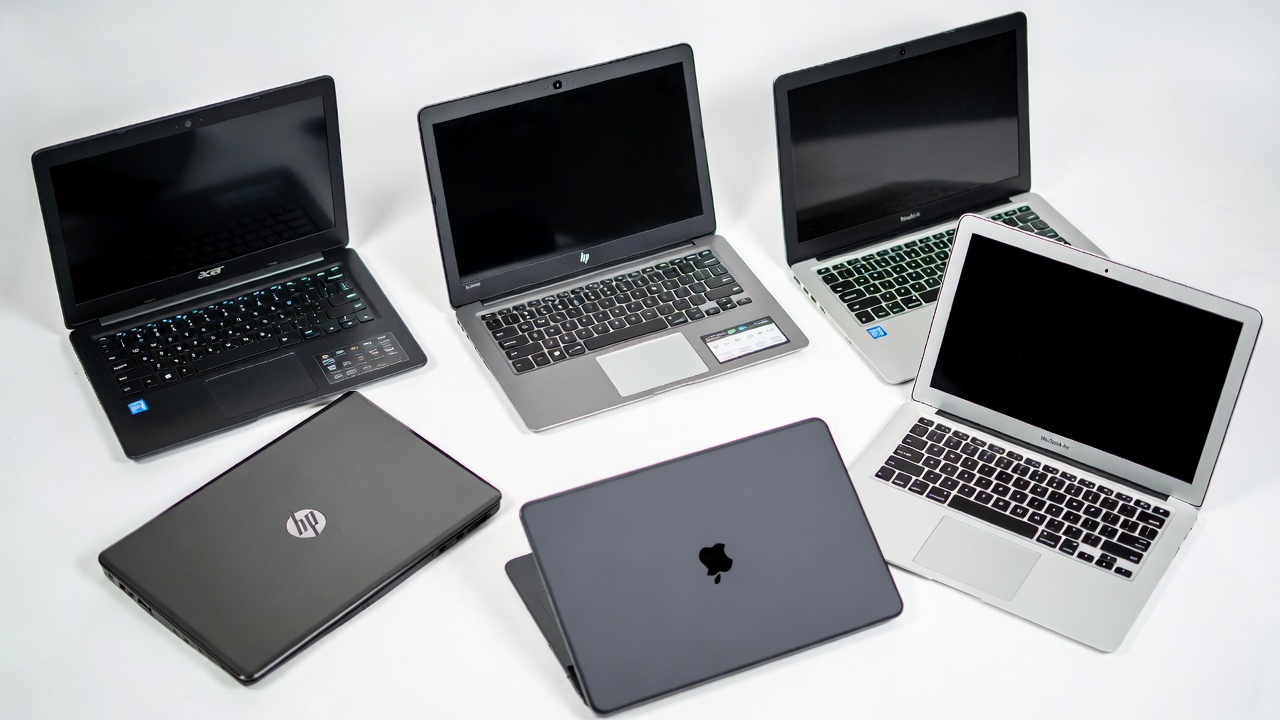
Six Budget Laptops That Consistently Deliver for Remote Work in 2026
After following the market closely and speaking with IT professionals who deploy these machines at scale throughout 2025, several models consistently appear on the shortlist for the best budget laptop for working from home in 2026. These aren’t speculative picks—they’re devices with proven track records in actual office environments over the past year.
Acer Aspire 5 (2026 model): This remains the default recommendation for good reason. The 2026 refresh offers Intel Core i5-1335U or AMD Ryzen 5 7530U, 8GB or 16GB RAM, a 512GB SSD, and a 1080p 15.6-inch IPS display. It’s not particularly light or premium-feeling, but it’s reliable and widely available in the $500–$650 range. Battery life now consistently reaches a full workday with moderate use.
Lenovo IdeaPad 5 (Ryzen 5 version): Lenovo consistently produces excellent keyboards, which matters enormously if you type all day. The 2026 IdeaPad 5 offers strong Ryzen 5 7530U performance, good build quality for the price point, and now includes a 1080p webcam as standard. Prices range from $550–$700 depending on configuration and sales.
HP Pavilion Plus 14: HP’s Pavilion line has improved significantly. The 2026 Plus models feature 16:10 aspect ratio displays, which provide more vertical screen space for documents and web browsing. Battery life is excellent, and the 1080p webcam quality is better than average for this tier. Typically found between $550–$680.
Dell Inspiron 16 3000: Dell’s Inspiron line remains ubiquitous in corporate environments. The 16-inch model offers a larger display without significant weight penalty, and Dell’s support infrastructure is reliable. The 3000 series now includes SSDs as standard, finally eliminating hard drive configurations entirely. Expect to pay $500–$650.
ASUS Vivobook 15: ASUS has gained ground with the Vivobook line, offering competitive specifications and distinctive design options. The 2026 models feature OLED display options at the higher end of the budget range, which is unprecedented at this price. Standard IPS models start around $530; OLED versions begin at $700.
Apple MacBook Air M2 (refurbished): While not traditionally a “budget” brand, the M2 MacBook Air can now be found refurbished or on sale for around $750–$800. It offers exceptional performance, outstanding battery life, and a premium display. If your workflow is compatible with macOS and you can stretch your budget slightly, this remains one of the best values in computing. Purchase from Apple’s official refurbished store for full warranty coverage.
Common Mistakes When Choosing a Work-From-Home Laptop in 2026
One pattern I’ve observed repeatedly throughout 2025 is people buying based on storage size rather than storage type. A laptop advertised with “1TB of storage” sounds impressive, but if that’s a traditional hard disk drive (HDD) rather than a solid-state drive (SSD), the system will feel sluggish from day one. You cannot fix this with software optimization. While major brands have largely phased out HDDs in this category, some third-party sellers still offer outdated configurations at deceptive prices.
Another frequent oversight is display quality. Budget laptops were historically equipped with dim, low-contrast screens that cause eye strain after a few hours. The good news is that 2026 models have improved baseline display quality significantly. However, you still need to verify that you’re getting an IPS panel—TN panels still appear on absolute bottom-tier machines and should be avoided completely. Look for 300 nits of brightness or higher.
Port selection remains routinely underestimated. Many thin-and-light budget laptops now ship with only USB-C ports and a single USB-A. If you use legacy USB devices or need HDMI for external monitors, verify port availability before purchasing. Factor the cost of a basic dongle ($20–$30) into your total budget if you choose a minimalist machine.
Finally, webcam quality is no longer a secondary consideration. The shift to hybrid work has made video conferencing a core function. In 2026, a 720p camera is genuinely inadequate for professional presentation. Prioritize models with 1080p integrated webcams—they’ve become standard on most $550+ laptops and are worth the small price premium.
For those building a complete home office ecosystem, our PC builds and components section offers guidance on complementary hardware investments like external monitors and docking stations.
When to Consider Refurbished or Previous-Generation Models in 2026
If your budget is under $450, the new laptop market remains challenging. At this price point, manufacturers still cut corners on build quality, displays, and storage. This is where refurbished business-class laptops become genuinely compelling, perhaps more so now than ever.
Models like the Lenovo ThinkPad X1 Carbon (Gen 9 or 10), Dell Latitude 7430 or 7440, and HP EliteBook 845 G9 were $1,500+ machines when new. After two to three years, they enter the refurbished market at $350–$500. These laptops offer superior build quality, excellent keyboards, better displays, and more robust construction than any new $450 laptop in 2026. They also typically use standard components that are easily replaceable when something fails.
If you choose this route, purchase from reputable refurbishers with clear grading systems and return policies. The “Certified Refurbished” or “Excellent” condition ratings from established sellers on Amazon, Backmarket, or dedicated refurbishers are generally reliable. Avoid individual sellers or listings with vague condition descriptions.
While exact figures may vary depending on context and current market fluctuations, a well-maintained business-class laptop from 2023 or 2024 will outperform a brand-new entry-level consumer laptop in almost every meaningful metric for remote work—particularly in build quality, keyboard feel, and long-term reliability.
For users comfortable with alternative operating systems, our operating systems guide covers lightweight Linux distributions that can extend the useful life of older hardware.
Practical Tips for Extending Your Budget Laptop’s Lifespan
The best budget laptop for working from home isn’t just the one you buy today—it’s the one that still works reliably three or four years from now. How you maintain the machine matters enormously, and 2026’s more powerful budget hardware requires the same care as premium devices.
Thermal management is the silent killer of laptop longevity. Budget laptops often have less sophisticated cooling systems than premium models. Keeping the laptop on a hard, flat surface (not a bed or sofa) allows airflow. Compressed air every few months to clear dust from vents prevents internal heat buildup that degrades components over time. This simple maintenance routine adds years of reliable service.
Battery care also extends useful life. Lithium-ion batteries degrade fastest when kept at 100% charge constantly or drained to 0% regularly. If you primarily work plugged in, most 2026 laptops include battery charge limiters in their software utilities—setting a maximum charge of 80% significantly extends battery health. Lenovo Vantage, Dell Power Manager, HP Power Manager, and similar tools offer this functionality. Use them.
Operating system maintenance matters too. Uninstall software you don’t use, limit startup programs, and keep your system updated. Windows 11’s built-in antivirus is sufficient for most users; third-party antivirus programs often slow down budget hardware without providing meaningful additional protection. Windows 11 2025 Update and the upcoming 2026 Update include performance optimizations specifically for lower-spec hardware—stay current with updates.
Finally, invest in a quality laptop sleeve or case. The physical damage that occurs during transport—drops, pressure on the lid, liquid spills—remains a leading cause of premature laptop replacement. A $30 sleeve is remarkably effective insurance for a $600 investment.

Windows 11, ChromeOS, or macOS: Choosing Your Platform in 2026
Your choice between Windows, ChromeOS, and macOS fundamentally shapes what budget laptop for working from home options are available to you. Each has legitimate trade-offs that go beyond personal preference, and the landscape has shifted slightly in 2026.
Windows 11 remains the most flexible platform. It runs virtually all business software, offers the widest hardware selection, and is what most corporate IT environments standardize on. Windows 11’s 2025 Update introduced better resource management for lower-spec devices, making budget Windows machines more responsive than previous generations. The downside remains bloatware—pre-installed trial software that slows performance until manually removed. Setting aside 30 minutes to uninstall these programs is still almost mandatory for optimal performance.
ChromeOS has matured significantly and gained enterprise adoption. Modern Chromebooks run Android apps, Linux applications, and progressive web apps seamlessly. If your work is entirely web-based—Google Workspace, Office 365 online, web apps, cloud storage—a Chromebook with 8GB of RAM is an excellent, affordable choice in 2026. The security model is simpler, updates are seamless, and they remain fast even on modest hardware. The limitation remains specialized desktop software; if you need Adobe Creative Cloud, advanced Excel macros with VBA, or industry-specific Windows programs, Chromebooks won’t work.
macOS, primarily on refurbished M2 MacBook Airs, offers exceptional build quality and longevity. Apple supports devices with software updates for six to eight years, and the M2 chip remains competitive in 2026. The barrier is typically software compatibility and budget—even refurbished, Macs command a premium over equivalent Windows hardware. However, Apple Silicon’s efficiency means even base configurations deliver excellent battery life and quiet operation.
For mobile workers who need seamless ecosystem integration with smartphones, our smartphones and accessories guide covers cross-device productivity workflows including phone link features in Windows and Continuity in macOS.
Making the Final Decision: Matching Hardware to Your Actual Workflow
After reviewing specifications, models, and strategies, the final step is honestly assessing your daily workflow. This is where many purchasing decisions go wrong—buying for the edge case rather than the typical day.
If 90% of your work involves a browser, email, and occasionally editing documents, a Chromebook or entry-level Windows laptop with 8GB of RAM is entirely sufficient. Spending more on a high-performance processor you’ll never fully utilize isn’t getting better value; it’s spending money on unused capacity.
Conversely, if you regularly work with large spreadsheets, have twenty browser tabs permanently open, participate in video calls while running multiple applications, the extra investment in 16GB of RAM and a faster processor directly improves your daily experience. This isn’t about future-proofing—it’s about meeting the demands of your actual work in 2026.
One practical exercise: Open your current computer and count how many applications and browser tabs are genuinely active during a typical work hour. Task Manager (Windows) or Activity Monitor (Mac) shows real-time memory usage. If you’re consistently at 80% memory utilization or higher, 8GB will feel constrained. If you’re below 70%, 8GB is likely sufficient.
The best budget laptop for working from home in 2026 is ultimately the one that matches your specific workload without paying for capabilities you don’t need. That intersection of sufficient performance and reasonable price is different for everyone, but the principles for finding it are consistent. The market has improved meaningfully over the past year—good options exist at every price point from $450 to $750.
For those integrating their laptop with a broader smart home ecosystem, our home automation section covers complementary productivity-enhancing technology for your complete home office environment.

Conclusion
Choosing the best budget laptop for working from home in 2026 doesn’t require technical expertise—it requires clarity about what you actually need and what compromises are acceptable. The market this year offers genuinely good options between $500 and $750 that deliver reliable performance, decent displays, and sufficient memory for productive remote work.
Prioritize 8GB of RAM as your absolute minimum, insist on an SSD, and verify that you’re getting a 1080p IPS display. Beyond that, let your specific workflow guide your processor choice and whether you need 16GB of RAM. Consider refurbished business-class machines if your budget is tight or you value build quality and serviceability over having the absolute latest model.
Your laptop is your primary office tool. Investing the time to choose thoughtfully—rather than rushing to the lowest price or most alluring sale—pays dividends in daily frustration avoided and years of productive service. The right machine won’t just save you money today; it will support your work consistently for years to come. The improvements in the 2026 budget laptop segment mean that a carefully chosen machine at this price point can reasonably be expected to serve you well through 2029 or 2030.
🛒 Recommended Products for Remote Work Laptop Buyers
Based on the best budget laptop for working from home criteria discussed in this article, we’ve curated a selection of top-rated laptops and accessories that deliver exceptional performance and value in 2026. These recommendations represent models that consistently receive positive feedback from remote workers and align with the practical framework we’ve outlined.
Frequently Asked Questions About Budget Laptops for Remote Work in 2026
Is 8GB of RAM still enough for working from home in 2026?
Yes, 8GB remains sufficient for standard office workflows involving browsers, email, document editing, and video conferencing. However, 8GB is now the floor, not the recommendation. If your work involves heavy multitasking, large datasets, or you plan to keep the laptop for 4+ years, 16GB is strongly advised. Applications and web services continue to become more memory-intensive.
Are Chromebooks finally suitable for primary work machines?
Yes, for web-based workflows. Chromebooks with 8GB of RAM and modern processors handle Google Workspace, Microsoft 365 online, and most web applications excellently. The gap between Chromebooks and Windows laptops for basic office work has essentially closed. They remain unsuitable for Windows-only desktop applications or specialized creative software.
How much should I spend on a work-from-home laptop in 2026?
A reliable new laptop for remote work typically costs between $500 and $750 in 2026. Below $500, significant compromises in display quality, processor performance, or build materials remain common. Refurbished business laptops offer an alternative path to quality hardware below $500. The $600–$700 range now delivers exceptional value with 16GB RAM and 512GB SSD becoming standard.
Is Intel Core i3 sufficient for remote work in 2026?
A modern Intel Core i3 (13th generation or newer) is sufficient for basic office tasks, email, and web browsing. However, modern i3 processors include efficiency cores that improve multitasking over previous generations. That said, the price difference between i3 and i5 configurations has narrowed, and i5 offers noticeably smoother performance for video calls while running other applications.
Should I buy an extended warranty in 2026?
For new laptops under $700, the standard one-year manufacturer warranty remains typically sufficient. For refurbished laptops, purchasing from a seller offering a minimum one-year warranty is advisable. Extended warranties from retailers generally remain poor value relative to the cost of the device. Consider that a $70 extended warranty on a $550 laptop represents 13% of the purchase price.
What screen size is best for remote work in 2026?
14-inch remains the best balance of portability and usable screen space for most people. 16:10 aspect ratio displays (taller screens) have become more common in this category and provide meaningful additional vertical workspace for documents. 15.6-inch provides more workspace but reduces portability. 13-inch is compact but can feel cramped for extended use without an external monitor.
How important is the webcam quality in 2026?
Essential. The shift to hybrid work has made video conferencing a core professional function. A 720p webcam is genuinely inadequate for professional presentation in 2026. 1080p webcams are now standard on better budget laptops and are worth prioritizing. Some 2026 models also include basic AI framing and background blur in hardware, reducing CPU load during calls.
Can I add more RAM to a budget laptop later in 2026?
It depends entirely on the specific model. Many ultra-thin budget laptops continue to have RAM soldered to the motherboard and cannot be upgraded. Some larger models, particularly in the Acer Aspire and Dell Inspiron lines, retain accessible SODIMM slots. Check the specifications or service manual before purchasing if upgradeability is important to you. Storage is more frequently upgradeable than memory.
Are OLED displays worth the premium for budget laptops?
For creative professionals or anyone who spends 8+ hours staring at a screen, the improved contrast and color accuracy can justify the $100–$150 premium. However, OLED panels consume more power and carry a theoretical risk of burn-in with static interfaces (like taskbars). Most remote workers are well-served by modern IPS panels, which have improved significantly and offer better battery efficiency.
How long should a budget laptop last in 2026?
With proper care, a well-chosen budget laptop should remain functional for daily office tasks for 4 to 5 years. Build quality and component selection at the $600–$700 price point now typically support this lifespan. Entry-level laptops under $400 still show significant wear or performance degradation sooner. The improvement in baseline specifications (SSDs, 1080p displays, 8GB RAM) means 2026 budget laptops are more future-proof than their 2022 counterparts.
What about ARM-based Windows laptops?
Windows on ARM has improved significantly with the Snapdragon X Elite and X Plus processors. These offer excellent battery life and competitive performance. However, application compatibility, while much improved, is not yet universal. For general office work and web applications, ARM-based Windows laptops are viable options in 2026. For specialized x86 applications, confirm compatibility before purchasing.
- Best Cheap Smartwatch Under $50
 Best Cheap Smartwatch Under $50: 5 Reliable Picks for 2026 By Sanso Uka If you’re hunting for… Read more: Best Cheap Smartwatch Under $50
 - Best Dash Cams of 2026
 Best Dash Cams of 2026: Top Picks for Every Driver and Budget By Wanderson Nogueira Martins Choosing… Read more: Best Dash Cams of 2026
 - How to Transfer Data to New Phone
 How to Transfer Data to a New Phone: A Step-by-Step Guide for 2026 By Sanso Uka Upgrading… Read more: How to Transfer Data to New Phone
 - Senior-Friendly Smartphones 2026
 Senior-Friendly Smartphones 2026: Best Overall Picks for Every Budget By Sanso Uka Senior-friendly smartphones in 2026 have… Read more: Senior-Friendly Smartphones 2026
 - Best Mechanical Keyboards in 2026
 Best Mechanical Keyboards in 2026 Best Mechanical Keyboards in 2026: Top Picks for Every Budget and Use… Read more: Best Mechanical Keyboards in 2026
 - Best Monitor for Home Office 2026
 Best Monitor for Home Office 2026: Expert Picks & Buying Guide By Sanso Uka Your monitor is… Read more: Best Monitor for Home Office 2026
 - How to Extend Smartphone Battery Life
 How to Extend Smartphone Battery Life: 12 Practical Tips That Actually Work By Sanso Uka You unplugged… Read more: How to Extend Smartphone Battery Life
 - Best E-Readers in 2026
 Best E-Readers in 2026: Which One Is Actually Worth Buying? Best E-Readers in 2026: Which One Is… Read more: Best E-Readers in 2026
 - Refurbished vs New Laptop
 Refurbished vs New Laptop: Which Should You Buy in 2026? By Sanso Uka When you’re in the… Read more: Refurbished vs New Laptop
 - Best Gaming Headsets Under $100
 Best Gaming Headsets Under $100 in 2026: Top Picks for Every Platform By Sanso Uka Finding the… Read more: Best Gaming Headsets Under $100
 - How Long Do Laptops Last
 How Long Do Laptops Really Last? A Practical Guide to Lifespan By Sanso Uka If you are… Read more: How Long Do Laptops Last
 - Best Portable Charger 2026
 Best Portable Charger in 2026: Top Power Banks for Every Budget and Use Case By Wanderson Nogueira… Read more: Best Portable Charger 2026