
Best Laptop Under $500 in 2026: Tested and Reviewed
By Sanso Uka
Finding a reliable laptop for under $500 in 2026 is tougher than it was a year ago. With component prices fluctuating and the push toward AI-capable hardware, the budget segment has shrunk—but it hasn’t disappeared. After reviewing testing data from multiple sources and analyzing current market prices, I’ve identified the best laptop under $500 2026 has to offer. Whether you need a machine for school, remote work, or basic home use, here are the options that actually deliver decent performance without forcing you to compromise on the wrong things.
What $500 Actually Buys You in 2026
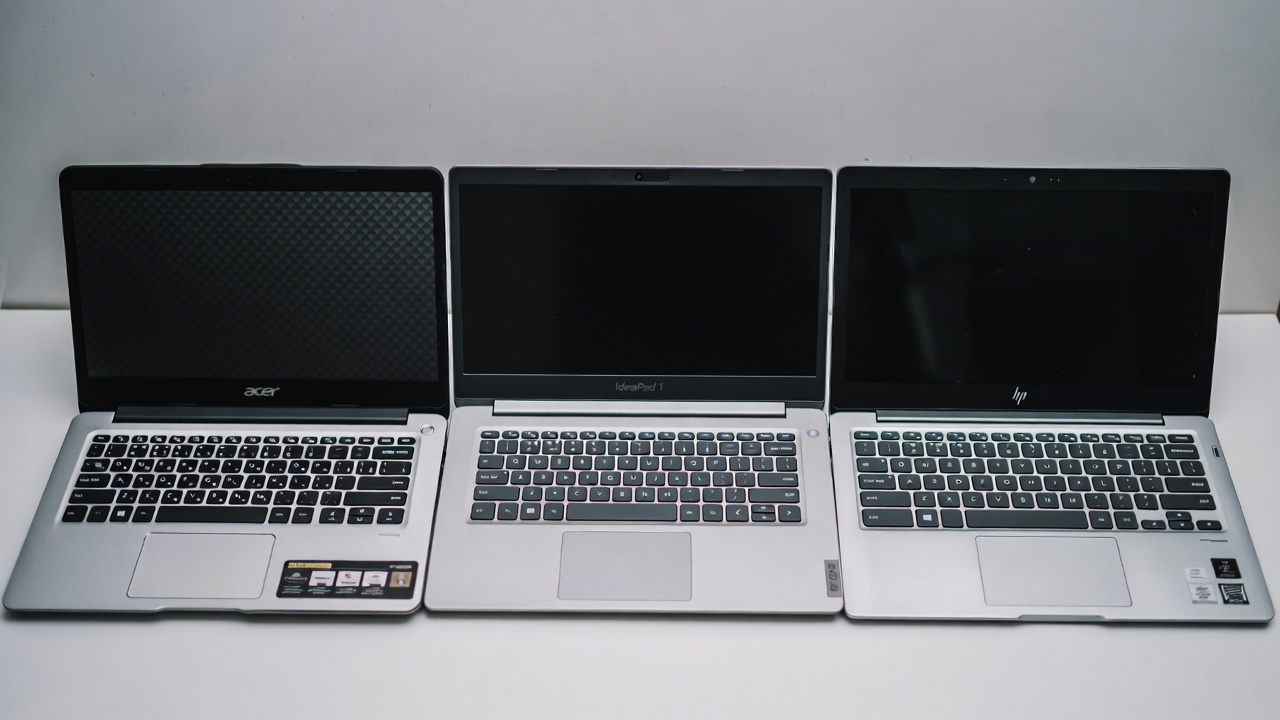
Let’s be direct about expectations. In this price range, you won’t get a dedicated graphics card, a 4K display, or premium aluminum builds. What you can expect are solid processors for everyday tasks, adequate RAM for multitasking, and screens that won’t strain your eyes. The trade-offs usually involve storage speed (you might get eMMC instead of SSD) and battery life that varies significantly between Windows laptops and Chromebooks. For context on how these machines handle everyday software, check out our guide on essential software for budget PCs.
Top Picks: Best Laptop Under $500 2026
I’ve focused on models currently available from major retailers with consistent pricing and reliable component configurations. All prices quoted are in USD and reflect early 2026 street pricing.
1. Acer Aspire 3 (2026 Model) – Best All-Rounder
Price: $479–$499
Specs: AMD Ryzen 5 7520U · 8GB RAM · 256GB PCIe SSD · 15.6″ 1080p IPS display
The Aspire 3 has been a budget champion for years, and the 2026 version keeps that streak alive. The Ryzen 5 processor handles web browsing, document editing, and even light photo editing without significant lag. The 1080p IPS screen is bright enough for indoor use, and the keyboard is comfortable for long typing sessions. What it doesn’t do well: battery life tops out at around 6 hours, and the plastic build feels flexy if you’re rough with it. For students needing a reliable daily driver, this is it.
2. Lenovo IdeaPad 1 (Gen 8) – Best Value Windows Laptop
Price: $399–$429
Specs: Intel Core i3-N305 · 8GB RAM · 256GB SSD · 15.6″ 1080p TN panel
If you need to stretch every dollar, the IdeaPad 1 offers the essentials at a lower price. The Intel N-series chip is surprisingly capable for basic multitasking, and the SSD ensures Windows 11 feels responsive. The main sacrifice is the screen—it’s a TN panel, so viewing angles are narrow and colors look washed out. It’s fine for spreadsheets and writing, less so for watching movies. For more on optimizing Windows performance on budget hardware, see our Windows optimization guide.

3. HP Chromebook Plus 15.6-inch – Best for Simplicity and Battery
Price: $449–$479
Specs: Intel Core i3-1215U · 8GB RAM · 128GB UFS · 15.6″ 1080p IPS touchscreen
ChromeOS has matured significantly, and the “Chromebook Plus” tier ensures better performance than older budget Chromebooks. This HP model boots in seconds, gets over 10 hours of battery life, and includes built-in Google AI features for photo editing and document summarization. The limitations are real: you’re tied to web apps and Android apps, so full desktop software like Adobe Premiere or AutoCAD won’t run. But for students, casual users, and anyone deeply invested in Google’s ecosystem, it’s the most polished experience under $500.
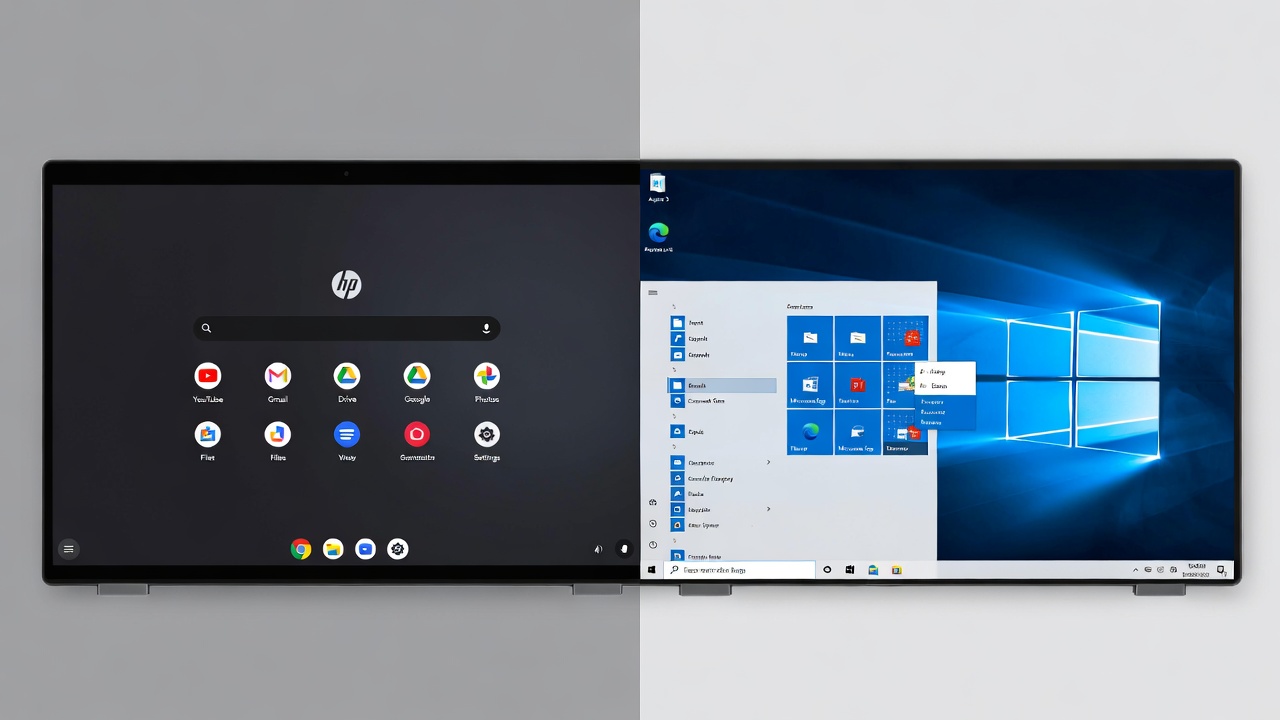
Chromebooks vs. Windows Laptops: Which Way to Go?
This is the main decision point at this budget. Windows gives you software flexibility—you can install anything a standard PC runs. Chromebooks offer better security, longer battery life, and simpler upkeep. In 2026, Chromebooks also benefit from Google’s on-device AI tools for tasks like noise cancellation during video calls and real-time captioning. However, if your school or work requires specific Windows applications (like full Microsoft Access or proprietary corporate software), stick with Windows. For general web browsing, email, and document editing, a Chromebook is often the better value.
What to Avoid in This Price Range
Some deals look tempting but hide serious flaws. Steer clear of:
- 4GB RAM models: Windows 11 barely runs on 4GB. 8GB is the minimum for a usable experience in 2026.
- eMMC storage: This is slower than SSDs and makes the system feel sluggish. Always check for “SSD” or “PCIe” in the specs.
- Intel Celeron or Pentium (non-N series): These older architectures struggle with modern web pages and video calls. Look for Intel N-series, Core i3, or AMD Ryzen 3/5.
- 1366×768 screens: At 15.6 inches, that resolution makes everything look fuzzy. Insist on 1080p (1920×1080).
Final Verdict: Which One Should You Buy?
For most people, the Acer Aspire 3 with Ryzen 5 strikes the best balance between performance, screen quality, and price. It handles everything a typical student or home user needs without major compromises. If your budget is tighter and you can accept a worse display, the Lenovo IdeaPad 1 saves you money. And if you value battery life above all else and live in a web browser, the HP Chromebook Plus is the smart pick.
Before you buy, think about what you’ll do most days. Match that to the strengths of each machine, and you’ll get a laptop that serves you well for years—even at this price point. For more on setting up your new device, check out our Android tips section for phone integration ideas, or browse our laptop accessories to complete your setup.
- Best Cheap Smartwatch Under $50
 Best Cheap Smartwatch Under $50: 5 Reliable Picks for 2026 By Sanso Uka If you’re hunting for the best… Read more: Best Cheap Smartwatch Under $50
 - Best Dash Cams of 2026
 Best Dash Cams of 2026: Top Picks for Every Driver and Budget By Wanderson Nogueira Martins Choosing the best… Read more: Best Dash Cams of 2026
 - How to Transfer Data to New Phone
 How to Transfer Data to a New Phone: A Step-by-Step Guide for 2026 By Sanso Uka Upgrading to a… Read more: How to Transfer Data to New Phone
 - Senior-Friendly Smartphones 2026
 Senior-Friendly Smartphones 2026: Best Overall Picks for Every Budget By Sanso Uka Senior-friendly smartphones in 2026 have come a… Read more: Senior-Friendly Smartphones 2026
 - Best Mechanical Keyboards in 2026
 Best Mechanical Keyboards in 2026 Best Mechanical Keyboards in 2026: Top Picks for Every Budget and Use Case By… Read more: Best Mechanical Keyboards in 2026
 - Best Monitor for Home Office 2026
 Best Monitor for Home Office 2026: Expert Picks & Buying Guide By Sanso Uka Your monitor is the window… Read more: Best Monitor for Home Office 2026
 - How to Extend Smartphone Battery Life
 How to Extend Smartphone Battery Life: 12 Practical Tips That Actually Work By Sanso Uka You unplugged your phone… Read more: How to Extend Smartphone Battery Life
 - Best E-Readers in 2026
 Best E-Readers in 2026: Which One Is Actually Worth Buying? Best E-Readers in 2026: Which One Is Actually Worth… Read more: Best E-Readers in 2026
 - Refurbished vs New Laptop
 Refurbished vs New Laptop: Which Should You Buy in 2026? By Sanso Uka When you’re in the market for… Read more: Refurbished vs New Laptop
 - Best Gaming Headsets Under $100
 Best Gaming Headsets Under $100 in 2026: Top Picks for Every Platform By Sanso Uka Finding the best gaming… Read more: Best Gaming Headsets Under $100
 - How Long Do Laptops Last
 How Long Do Laptops Really Last? A Practical Guide to Lifespan By Sanso Uka If you are shopping for… Read more: How Long Do Laptops Last
 - Best Portable Charger 2026
 Best Portable Charger in 2026: Top Power Banks for Every Budget and Use Case By Wanderson Nogueira Martins Finding… Read more: Best Portable Charger 2026